_____________________________________________________________________________________________________
Showing posts with label Things I do so you don't have to. Show all posts

Monday, June 15, 2009

We’re A Family of Geeks

For the next three weeks we’re going to be on the road.

In the air too.

We’re off to visit family.  First in Pensacola, Florida, and then up to Grand Rapids, Michigan.  I cannot even begin to emphasize how little it thrills me when I regard all that time in the hands of the commercial airlines and the sadistic incompetent jackasses of the Transportation Security Administration. 

You may expect ranting from the airports and various hotspots as we make our way through the bureaucratic dystopian nightmare that is modern air travel in the United States.

We’re traveling as lightly as possible. Despite the horror we Alaskans feel at the thought of searing Florida panhandle temperatures and suffocating southern Michigan humidity in June, the advantage of travelling at this time of year is that we don’t need three different wardrobes or heavy clothes.

Which should leave more room in our luggage for technology.

I’ll be carrying my trusty Gateway Tablet. With the extended-life battery it’s heavy, but I like the 7+ hours of operation I get out of it and I’m willing to suffer the extra weight. I also have a bunch of movies and audio books loaded on my ZEN – so unless the guy next to me has swine flu, I ought to survive the flight OK.

However, My wife’s laptop has been dying for a while now and we’ve been meaning to replace it.  She’s hated that machine pretty much from the day we bought it anyway – one of those, it looked good in the store deals. She’s been wanting a tablet similar to mine, only a bit more streamlined and much lighter.  We’ve looked at a number of different machines, but nothing really caught her eye. Until yesterday.  We were in Anchorage to see Pixar’s Up 3D  (excellent, charming, funny, poignant, well worth the money, and the digital 3D is seriously cool) and there’s a new Best Buy in town, outside the back gate of Elmendorf. Best Buy is usually a circus, but they’ve got a good selection of equipment and their Black Tie extended warranty service is second to none. So we thought we’d go look.

First, it wasn’t crowded. This pleased me enormously – I hate trying to evaluate technology while I’m being crushed by a crowd of mouth breathers.  Usually Best Buy makes me feel like I’m trying to board a Tokyo subway at rush hour, but at 8PM on Sunday in Anchorage there was only a handful of people in the place and plenty of polite help.

It didn’t take my wife very long at all to spot an HP tx2 – she could probably have walked past a basket of puppies in the pet store window with nary a second glance, but that HP called to her.

image

The tx2 is a touch and pen enabled tablet with a 12.1” HD digitizer touch screen incorporating HP’s TouchSmart technology, 2.1 core duo processor, 4GBs of RAM, 320GB drive and a super multi light scribe dual layer DVD. Fingerprint reader, webcam, and remote (for media and presentation control) built in. It’s running Vista Ultimate. It’s one of the most beautiful machines I’ve ever seen, fast, sleek, and light. I’ve spent the morning introducing it to the network and the other computers in the house, and now I’m installing my wife’s core office apps and moving her data and configuration settings from her old machine to the new one. The tx2 has been running on batteries for the last three hours and is still holding 53% charge (of course I haven’t been running the DVD drive, but the harddrive has been running almost continuously as I load data). The screen is gorgeous, crisp, clear, bright, and HD. The digitizer responds to the pen and to finger touch like an iPhone screen, simple finger motions control the machine, expand or contract or rotate and move the displayed images, control the sounds and video and a number of other functions. It’s pretty damned amazing.

I want one.  Sigh. But the keyboard is a little small for me and I like the bigger screen on the Gateway. Plus the GeekSquad at Best Buy just refurbished my tablet, gave me a new screen and everything, as part of their Black Tie service, so I expect that machine to last for quite a number of years yet.

We also picked up an HP Mini:

image

The Mini is basically a notebook about the size of a ham sandwich. It runs on an Intel Atom N270 processor, with 1GB of RAM and a 16GM solid state flash module which acts as the unit’s non-volatile storage instead of a harddrive – basically the machine has no moving parts, meaning that Li-Ion polymer battery lasts for hours despite being about the size of a slice of cheese in the aforementioned sandwich.  It runs on Windows XP, it’s got a couple of USB ports, an SD/MMC slot, and can connect wirelessly to just about anything there is.  It’s so damned light I expect it to float away.  You’re not going to store a lot of data on there, and the screen is only 9” wide, but it’s perfect for surfing the internet on the go and watching a few movies on.  The really nice thing about the Mini is that it retails for under $300, we picked this one up for $280.

I’ll carry my Gateway tablet, as usual. We’ll let my son use the Mini vice his personal laptop (which is much larger and heavier and has a dead battery which would have cost more to replace than the purchase price of the Mini), and my wife will probably parade through every airport between here and the panhandle showing off her cool new HP TouchSmart.  I’ll still haul along my ZEN, because I like watching movies on that over the laptop, and I’m sure my wife will do the same with her iPod.  And all of us carry our cell phones which work anywhere in Canada or the US without roaming charges. Each of us have a carry-on computer bag which will hold all our tech, plus a sweat shirt (airline blanket = gah), a couple of paperbacks, and a snack.

This upgrade in technology significantly reduces our traveling techno footprint. We don’t need my son’s large laptop, or the travel DVD player (and it's huge power supply and cords), and Becky’s new tablet is half the weight of her old machine and a dozen times more powerful.

I won’t say I’m looking forward to the hellish shit fest that is modern air travel in America, but new tech makes it a little less painful.

Sunday, September 14, 2008

A first look at Google's Chrome

Hmmm, looking at my stats I see a number of visitors are using Google's new browser, Chrome.

Interesting.

I've been playing around with Chrome for a couple of days. Usually a new product from Google seriously impresses me. Chrome? Meh, it's
okay, but it isn't going to be replacing Firefox as my default browser any time soon.

Compared to the bloated Microsoft Internet Explorer or even Mozilla's latest version of Firefox, Chrome is incredibly minimalist. Now, by minimalist I don't mean first generation
Mosaic or anything, but the browser doesn't exactly have a lot in the way of bells and whistles. True, that minimalist approach has a certain attraction, particularly because it's fast - much faster than either IE7 or FF3. Chrome has the basic stuff you'd expect in a modern broswer, tabs and image zooming and stealth mode (called an 'incognito page' in Chrome) and its full screen view (which is how I normally run a browser) isn't too bad, not as good as IE7, but better than FF3.

Chrome does have one cool feature that I really like - it keeps track of the sites you visit and puts them up as thumbnails, sorted by order of use, on any new tab. That's a neat and useful feature most of the time. Note that any pages viewed in an incognito window aren't recorded and so don't add to the indexing that drives this feature. So, you know, as long as you're using the incognito function, that Republican airport fetish site you visit on a regular basis won't appear on the top of your 'Most Visited' list. Probably a good thing, just saying.

Other than that though, there's not a lot to Chrome. There's no third-party add-on, or plug-in support - no first party either for that matter. I've seen a couple of geek tech sites that give you a methodology for adding Firefox add-ons using Chrome's bookmark function. Bah, this is a kludge at best and not real add-on functionality. And until I can add-in PicLens, colored tabs, IE tab (for Microsoft specific sites), and the like - Chrome is going to be more of a novelty than a useful tool to me.

There's no integrated spell check function - so if you notice a number of spelling errors in this post, it's because I'm using Chrome at the moment and flying solo without spell checking. Yeah, nobody want's that. No integrated spell checking? Seriously, it's 2008, Google, what the hell are you thinking?

I'd hoped that Google would at least provide specialized integration to their other products, Blogger, Picasa, Google Maps, Google Earth Plus, and etc. Nope. Chrome gives me no additional functionality with those service that I don't already get with Firefox.

Chrome's bookmark function? Sucky. It did import my Firefox bookmarks, but there isn't even sorting capability. There's minimalist, and then there's just plain primitive.

There's no download manager.

Now, knowing Google, and the kind of innovation and the just plain cool way they usually approach information technology, I suspect that Chrome will grow and rapidly evolve into a serious and advanced piece of internet software.

But the key word here is 'evolve' - because at the moment Chrome is somewhere in the Proterozoic era.

______________________

Note: Chrome and blogger's editor don't exactly get along. Hence the weird mix of fonts in this post. I could fix it, but, you know, I think it just adds to the charm of this place.


Thursday, August 28, 2008

The Firefox 3 for Windows Upgrade

As I mentioned Tuesday, I finally decided to upgrade to the latest release of Firefox.

I'm an unabashed fan of Mozilla's open source browser, and have been since version 1.  But, I'm inherently conservative when it comes to software. I feel no compelling need to have all the latest and greatest shiny new software toys.  I'm a geek, true, and I have a degree or two in computer science, I've done extensive programming, and spent most of my life in the information warfare field and worked with everything from massive MPX mainframes to clustered DEC FIDI systems to a palm-sized Clie - but I hate fooling around with computer systems.

It's like auto mechanics.  Some guys love tinkering under the hood, tweaking, aligning, and polishing the motor. Being covered in grease makes them happy. They talk about cars, and engines, transmission and differential gear ratios, fuel injection versus 4-barrel carbureted air/fuel mixing and that all important quarter mile.  Bah. Me, I can work on cars and trucks, but more than anything I just want the dammed thing to start up reliably and get me where I'm going. And it's the same with software, I'm less interested in bells and whistles and tweaks and geeks, and more interested in having the dammed machine do what I need it to do, when I need it to do it.

As such, I usually wait a bit - sometimes quite a while - to upgrade to the latest software. In fact, I prefer to let everybody else work out the bugs and quirks before upgrading, especially if the software version I'm currently using does everything that I want it to do.  I mean, hey, why the hell should I do free beta testing for a software developer? Frankly I don't need the aggravation.

Be that as it may, I spend a great deal of time hip deep in the Internet, and having the latest version of my favorite browser holds a certain attraction. After a year's development, Firefox 3 has reached stability and is spreading through the web via word of mouth and Mozilla's updater function, and after about the third upgrade availability notification I decided to give it a try.  I figured I'd update the main Vista machine first. If that went well, I'd upgrade the XP tablet, which is where I do most of my online work.  If the upgrade crashed and burned on the Vista machine, well, no big deal.

So, choices, choices. I'm of two minds when it comes to this kind of thing, i.e. should I remove the old version first and do a virgin installation - losing my settings and such in the process, but getting a clean install - or should I simply install over the old version?  Of course, with a browser, even one as advanced as Firefox, this isn't that big of a decision - not like choosing to do a Vista install over XP, for example. However, there have been reported problems with Firefox upgrades over an existing version - especially when it comes to printing (which I'll come back to in a minute) - and as software rapidly evolves and becomes increasingly complex the number of things that can go wrong, both gross problems and subtle incompatibilities which may cause strangely inexplicable problems following an upgrade increase exponentially.  Systems are like snowflakes, the variations in configurations, hardware and software both, are nearly infinite - and there's just no way even the best software development team can foresee every contingency.  Five or six years ago, this wouldn't have been a concern, but browsers and network connectivity are now so deeply integrated into the operating system that it often makes sense to slick the old software first, rather than try and troubleshoot the endless little errors that creep into your system after countless upgrades and tweaks.  You can lose hours of productivity and find yourself chin deep in screaming frustration - all because your upgraded software installation imported incompatible configuration settings from the old version. If it's just one thing, it's usually easy to find. If it's a combination of things, you may never find it - especially if the problem is buried in the program's data and not caused by a bug in the software.

Example: I upgraded from Microsoft Office Outlook 2003 to 2007 recently. I installed over the old version, because I wanted to keep my email, notes, and contact database.  The installation appeared to go off without a hitch - but the dammed thing kept crashing every couple of hours.  And then would hang on crashdump process, so I had no way of figuring out what was causing the problem. I removed all add-ons and plug-ins per Microsoft recommendation. No joy. Crash, crash, crash. Then I noticed the crashes occurred during folder synchronization.  Hmmm.  I flushed the database, archiving anything older than 6 months, and purged the sent items file. And the crashes stopped. Somewhere in my old email files, was a bit of data that kept corrupting the system and inducing the crash.  Did that corruption appear in the old version, or was it an error that occurred during import into the new version during the installation process? I don't know, but it caused me endless aggravation for quite some time.

And it's the same concern here. One of the things that makes Firefox so attractive to me is the ability to add in functionality with third party plug-ins and freeware extensions. And I use a lot of them, not all of which are going to be compatible with Firefox 3 out of the box. And I've got thousands of bookmarks, organized in a very specific manner. And those things could easily cause problems during the upgrade process. 

However,  I decided to go with the upgrade method vice a clean install, for a couple of reasons. First, if it works, it's easier, one click on the upgrade dialog box and off you go. Mozilla has always been extremely good about this process and I was willing to trust them this time based on their past performance - if this was a Microsoft product, I would probably not have been so trusting, just saying, once burned, twice shy and all that. Second, Mozilla has always had very good compatibility checking for add-ons and extensions and again I was willing to trust them.

The download and installation worked smoothly and without error - another advantage of waiting to upgrade, I didn't have to compete with a million other folks attempting to download the pre-release version at the same time.  Once the installation was completed, Firefox's compatibility checker popped and ran automatically - and reported that a number of my existing extensions were no longer compatible.  Some were things I really, really don't want to do without - like PicLens - and some were things that simply aren't necessary in the new version of Firefox.  A number of outdated extensions had compatible updates, and Firefox detected those automatically and downloaded the new plug-ins without problem. I deinstalled the incompatible extensions, after checking manually to see if there were updates. PicLens (a phenomenally useful tool for searching out graphics and video across the web) as it turns out, has been updated and renamed CoolIris - which is why the compatibility updater couldn't find it.

Here are the extensions I know update automatically and work with Firefox 3:

Gmail Notifier, Google Toolbar for Firefox, IE Tab, New Tab Homepage, Adblock, Better Gmail, Colorful Tabs, Foxmarks Bookmarks Synchronizer, Save Session, Split Panel, StumbleUpon, and ClearPersonalData.

PicLens has to be manually upgraded to CoolIris, and after that it updates automatically.

All of the functionality in other extension I had loaded has been incorporated into Firefox itself and I no longer need the third party plug-ins. All in all, they've made over 15,000 changes, according to their website and as far as I can tell after three days of fooling around with version 3, most of them are pretty slick.

None of the themes I used in Version 2 were compatible with the upgrade. Oh well, no big deal, and I deinstalled all of them.  And, truthfully, I like the new default look of Firefox, Mozilla has finally gotten completely rid of the last vestiges of that old hoary Netscape interface and I doubt I'll even load new themes.


Now, the good stuff:

In addition to the shiny new look, the thing I like best about Firefox 3 is the significant improvement in performance. It starts up a hell of a lot faster, and page loads seem much quicker and smoother to me.  Firefox now has true image zooming capability, but truthfully I tend to use CoolIris and don't really use this new feature much. I really like the Smart Location Bar, especially the site information feature which I find extremely useful (though I noted that Mozilla itself doesn't provide much useful information on its own site, heh heh), the expanded history drop down is a cool feature as are the one-click bookmark and subscribe controls. I particularly like how browsing history management has been improved and reorganized, and the new Add-on manager. There really are too many new features, all of them good, to mention here. If you're interested, check out Mozilla's Firefox 3 new features page, you can't say Mozilla doesn't listen to their users.

Next, the not-so-good things:

Well, there aren't a lot of problems with Firefox 3, but what problems do exist are a major pain for a number of folks. I haven't experienced much in the way of grief here, but before you upgrade you might check out The How-To Geek as a starting place.

The biggest issue for a lot of folks seems to be with printing, as noted here by commenter Tracy.  In a number of cases Firefox spits out gibberish when it comes to hardcopy.  This problem is not confined to a single printer type or to Vista or XP, and seems to appear equally in both clean installations and upgrades. The problem seems to be a bug in how FF3 communicates with Windows' winPrint module and/or a driver issue and as yet there doesn't seem to be much information available on Mozilla's Support Forums.

A couple of work-arounds that might work for you:

1) under tools/options/content, click the "advanced" button and uncheck the "Allow pages to choose their own fonts." Click Ok, then OK again on the content dialog. Try printing.

2) in the same dialog change the default fonts.  From Times New Roman to Trebuchet for example. Change the font size, save changes and exit. Try printing. If this works, change the fonts back to Times New Roman, save the changes and try printing again.

3) in the same dialog, change the default character encoding to an alternate encoding set.

4) Ensure "Enable Advanced Printer Features" is checked under your printer properties for your selected printer in the Windows Control Panel.

Again, these are work-arounds, not complete solutions. Not all of them work on all machines.

I would expect Mozilla, being Mozilla and not Microsoft, will have this problem fixed pretty quick. 


Bottom Line: Overall, I'm pretty happy with Firefox 3, but I haven't had the problems others have reported.  At the moment it appears to be a crapshoot whether or not you'll experience any of the reported problems.  And at least until the printing bug is fixed, I'd be patient if I were you and wait until the next interim update.

Wednesday, April 16, 2008

This is a test, this is only a test

I'm trying something new in blog editing this morning - so if you see weird stuff try not be be unduly alarmed (weirder than usual from me, that is).

I downloaded Microsoft's new Windows Live Writer as part of my Live Messenger upgrade. Live Writer is supposed to work with most popular blog sites, including Blogspot. It gives you a much better interface than Blogspot's generic editing page, and a wide array of tools for graphic insertion, editing, and HTML coding.

Specifically, Live Writer supposedly includes the following:

1. WYSIWYG - and so far that looks to be the case. I'm currently switching back and forth between "normal view" and "web layout" and "web pre-view." It's pretty cool.

2. Streamlined graphic upload, haven't tried that yet. Let's see how it works.

Shemya

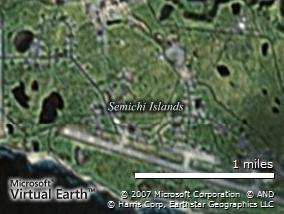
Hmmm, seems to load into Writer just fine, we'll see if my editing holds once it uploads to Blogspot (that's Sheyma Island, Alaska by the way, my erstwhile home away from home, 1500 miles from Anchorage at the very tip of the Aleutians).

3. Tables, let's see how that works:

Table Test Table Test

It's easy to make a table in Writer, we'll see what it looks like after the publish.

4. Maps! Ooooh! Shiny. Let's see if it works.

Map image

Eh, it's Microsoft Virtual Earth, but I was able to pull up Shemya. Coolness.

5. Tags. This was a minor bitch in the first reviews - no tag insertion capability. Microsoft fixed it and the latest version includes an easy method for tagging your posts to common providers like Technorati.

6. Video. I'll try this one later.

7. Plugs-ins. You can add all kinds of third party plug-ins. I looked at a few of them and may add a couple later.

8. A clean interface with lot's of extra tools.

9. Off-line drafts and composition.

10. Much better control over hyperlink behavior.

11. It's free.

Like with any Microsoft product I'm treading carefully, looking for land mines, but so far, it's pretty cool. So far.

It installed easily, and the configuration process that links it to your webpage is a snap.

And now for the ultimate test - publish.

-----------------------------------------------------
Post Publish Update: It Works.

One thing, pictures are uploaded to Picasaweb first, then loaded to blogger. How that works for other blogging sites I have no idea. You have to agree to the terms and conditions on the picasa site - it's painless, though I would have preferred to use Flickr, since I already have a Flickr Plus account.

Anyway, Live Writer seems to be pretty cool.

Tuesday, January 22, 2008

Everything I need to know about politics, I learned in sixth grade

When I was kid in sixth grade, Jeff Bestwick was running for student body president.

I don't know if, these days, sixth graders still elect a student body president - my son is in sixth grade and I haven't heard beans about it. But in my day, elementary school elections were supposed to introduce you to the American democratic process and teach you how our government worked. A lady from the local polling station came and gave us a lecture on voting machines. She brought a huge mechanical tabulator and we all got to flip the switches and pull the lever behind the curtain, like being the Wiz in the land of Oz. I remember thinking it was very exciting.

Now, Jeff, he was a slick kid, handsome and popular. His opposition was a girl, who's name long escapes me. I do remember that she was a bookishly practical girl, and that I didn't like her very much.

Even at that age, you could tell Jeff was destined for big things. He had perfect hair. He played sports. His parents had money. He was a straight A student. And there was little doubt that he would go on to a good college on some kind of scholarship and then on to a nice tidy life in law, or medicine, or politics. He was one of those kids that others gravitated to. I worked on his campaign, making posters. We all donated our lunch money to buy posterboard and markers and material to make campaign buttons. We stayed after school to work on the posters, and I often walked a couple of miles home instead of riding the bus because of it, but I was happy to be part of the process. Some of the mothers made cookies for us, and we had a lot of fun. Being from a poor family and none too popular, I was flattered to be one of the outer circle. Jeff even complimented me on my poster making abilities. He was a great guy.

And he was also a consummate bullshit artist.

The key plank in his election platform, pretty much the only plank, was a soda machine. Soda (pop, as everybody called it in Michigan) was a big deal to us kids. The only pop machine in the school was in the teacher's lounge, but us students didn't have access to it. Jeff promised us that if we voted for him he'd get us a pop machine. Cool. The opposition candidate, on the other had, was a real wet blanket. She said that a soda machine wasn't a good idea. She'd talked to the principle about it and her parents and she felt that it simply wasn't practical. She said there were more important thing we should be thinking about. I don't remember what those things were, but I do remember thinking she was just a Stupid Girl (I was eleven, sue me).

Jeff told us what we wanted to hear, in fact he made that soda machine sound like a done deal and you could practically taste those icy cold beverages when he spoke. Consequently he was swept into office on a wave of popular support. The Stupid Girl faded into the mists of history and the blurry depths of my increasingly fuzzy memory.

We never did see that soda machine though. Turns out that there were practical problems involving cost, regulations, nutrition, and President Bestwick just couldn't make good on his promises. He shrugged, smiled his winning smile composed of perfect orthodontic work, and said he'd done the best he could but it was out of his hands. And he never complimented me on my drawing abilities again, and he never thanked me for my support. In fact, he rarely ever spoke to me again, even though we rode the same bus daily until high school graduation and lived only a block or so apart.

You know, it's been forty years since Jeff Bestwick was Rosewood Elementary School's student body president, and his failure to live up to his campaign promises still chaps my ass. However, despite the fact that I spent my formative years without being able to enjoy a nice cool soft drink, I don't hold anything against Jeff because he did teach me some valuable lessons about politics and politicians. Things that have served me well over the last four decades:

1) Haircuts and hot air are directly proportional, i.e. the more money a politician spends on his haircut, the more full of shit he is. This is an infallible indicator of character. If he's got good hair, you're not getting the soda machine.

2) Politicians always tell you what you think you want to hear, always. With that in mind, you should probably figure out what it is that you really want. Are you sure that what you really want is a soda machine?

3) Popular kids don't give a crap about you, unless they need your vote. After they get your vote, they will go back to listening exclusively to their friends - until they need your vote again. They bring their own soda, and they don't share.

4) Rich kids don't give a crap about you, unless they need your lunch money. The more lunch money you have, the more they care about your concerns. If you've got enough lunch money, you can buy your own soda machine.

5) Politicians make promises on the campaign trail with their fingers crossed behind their backs. I.e. you're not getting the soda machine.

6) Don't expect to be remembered for your support or your sacrifice. I.e. the President's mom probably won't give you a lift home, even though you missed the bus working on her son's campaign. He'll wave as they go past, drinking a soda.

7) Sometimes there are cookies, but no soda. Cookies are cheap. Soda is expensive.

8) The teachers have the real power. I.e. you're not getting the soda machine.

9) Don't waste your vote on people you like or want to like you. Vote for those who can get the job done, even if you don't like them, even if they don't tell you what you want to hear, even if they don't have good hair, even if their mom doesn't make you cookies. I.e. you're not getting the soda machine, get used to it.

10) Always listen to the Stupid Girl, she's not nearly as stupid as you think she is. I.e. there's a reason why she didn't promise you a soda machine.

11) History doesn't remember the losers, even if they were right. Even if they bring soda.

12) You're not getting the soda machine.

----------------------

John Edwards, "I am committed to getting all troops out of Iraq within the first year of my presidency..."

Rudy Gulliani, "It's playing out the way we thought it would..."

Hillary Clinton, "I call my plan, the American Health Choices plan. ... If you have private insurance you like, nothing changes..."

Barrack Obama, “...we would immediately put some additional dollars in the pockets of American families..."

John McCain, "I do not support Roe versus Wade. It should be overturned." AND "I would not support repeal of Roe v. Wade..."

Mike Huckabee, "If you have the time and the luxury of going to Congress, that's always better ..."

There's more, a lot more, but I'll stop there.
-----------------

Yeah, nice hair. Got any cookies? How about a soda?

Sunday, January 20, 2008

Sunshine - The Movie

Saw Sunshine tonight on DVD.


The special effects are passable - after that things go downhill pretty damned fast indeed.

The plot is hackneyed, contrived, and easily predictable. The basic premise of the movie is ridiculous. The science is idiotic. The portrayed technology is retarded. The characters are cardboard cutouts. The camera work is nausea inducing. Apparently in the future nobody owns a light bulb, either that or they forgot to take the lens cap off during filming.

And worst of all? It's boring.

It's a lot like the directors of two other piece of shit movies, Event Horizon and Solaris, got together and had a bastard love child who came up with this turkey.

Don't bother. Really.

Wednesday, October 31, 2007

The Upgrade, part 2 (updated)

I won't belabor this whole upgrade process much longer, but there are a couple of things I want to say about it.

First, the bad part:
- A lot of my older software is no longer compatible, neither Pinnacle Studio 9 or the Pinnacle PCTV video box driver will load. There's an online Beta for the PCTV box, which I haven't tried yet, but it sure looks like I'm going to have to pay to upgrade to Studio 10. And for some reason I cannot find my Corel Paintshop disk, I have no idea what I did with it. I like this program much better than Adobe Photoshop, and it is seriously chapping my ass that I can't find it. If you see it, let me know.

- I hate how the Start Menu now works. I liked the old 'fly-out' menu of XP much better. There may be a way to make the Vista Start Menu/Programs menu work in fly-out mode, if so, I haven't found it yet.

- Some functions, such as disk sharing, have become a huge pain in the ass. I'm still not sure I've got the sharing functions working right. It is much less intuitive in Vista than under XP.

- Not even remotely impressed with the Windows Media Center. It has the most idiotic interface I've seen from Microsoft since Word 2.0 for MSDOS. What the hell were they thinking with this? It's like the whole WMC development team was out smoking pot behind the building or something. It's so dammed dumb that I'm not going to waste words attempting to describe it here.
Update: Ahhh! I suddenly understand - it's for TV! If you pipe WMC through a media server onto a TV screen and control it with a remote, then the interface makes more sense. OK, scratch what I said above, I'll go back and look at it when I get some time, maybe it's not so stupid after all. My bad.

- Windows Defender. It's not a total POS, but I'd get me some third party software if I was you.

Second, the good part:
- Uh, just about everything else. So far I like Vista, I've had almost no problems with it. I set up a machine for my dad a couple of months back, with Vista and didn't much like it - but it was a much less powerful machine and it was Vista Home Basic. Vista Ultimate on this machine is a whole different story. As I said yesterday, it does take some getting used to; the Vista interface is similar to, and just different enough from XP that it takes a while to figure out what's what. However, the help system is very good and as I get used to it, I am more and more impressed.

- The Aero interface is exceptionally cool (about the only downside, is that it makes my XP interfaces on the other machines seem instantly primitive). And you do have to have a fairly powerful machine to enable Aero, one of those $400 E-machines from Walmart isn't going to support it. There is plenty of integrated help in Vista to assist you in evaluating your machine's capability, and guide you in upgrading or tweaking your system to support Aero.

- I've heard some disparaging things regarding the Intel Quad Core processor and Vista, but I'm not seeing it. So far the Quad Core running under Vista Ultimate blows the socks off any other home machine I've ever used - and I've used and owned a lot of machines. I downloaded a Gadget (and we'll come back to Vista Gadgets in a minute) that shows the processor load across all four cores - then I started a number of processor intensive operations and watched the results. The processes were as follows: 1) import of 89,000 music files into WMP, 2) download and installation of a 127MB Service Pack for MS Office, 3) a hi-res label burn on the Lightscribe drive, 4) a 400MB file transfer from the firewire backup drive to the secondary internal SATA drive, and 5) I surfed the web while all this was happening (not processor intensive, but it gave me a feel for how loaded the machine was). It was as if the programs were running on four different machines, the Gadget showed Vista easily distributing the load across the cores and there was no appreciable slowdown in overall machine performance. Even with the Quad Core fully loaded, upload of my music files into WMP only took about two hours, this is about a 4 hour improvement over the old Dual Core/XP machine. Installation of the Office Service Pack went smoothly and quickly. I think the file transfer from the backup drive to the internal SATA drive took a little longer than it would have if it was the only thing running on the bus, but it wasn't significant. And the Lightscribe label burn worked perfectly. So, all in all, I'm impressed with both the Quad Core, and Vista's ability to use it - at least in my circumstances. It may be different for others, especially gamers.

- I prefer a clean desktop. About the only thing I ever have on the desktop is the recycle bin/trash can icon. I prefer my commonly used programs as shortcut icons on a toolbar docked on the Windows Taskbar, and I usually have the Taskbar in auto-hide mode. So, I wasn't too interested in the Vista Gadget Bar, but because I'm now using the wide-screen flat panel and I've got the screen room, I thought what the hell, let's give it a try. Hmmm, I've got mixed feelings about it. Most of the gadgets that come with Vista are silly crap, just more junk cluttering up my screen. I hate cutesy interfaces, i.e. notepads that look like a paper spiral notebook, clocks that look like kittens, etc, and that's what most of the stock gadgets are. However, there were some useful ones on the Microsoft Gadget Download page, and hundreds more available elsewhere on the web. Some are actually useful. Currently I've got a processor monitor and a local weather Gadget loaded - both of which I downloaded from the web instead of using the ones that came with Vista. The Gadget bar is obviously version 1.00 here. It needs some improvement: resizing and autohiding would be a step up, and some more utilitarian gadgets instead of the cutesy crap. The Gadget bar may stay on my desktop, and it may not, we'll see if it begins to annoy me after a while.

- Hardware integration. Vista's ability to handle new hardware is a major improvement over XP. All three printers installed perfectly and seemlessly as soon as the USB cables were plugged in. Same with both scanners, and the external firewire drive. About the only thing I had to fool around with was the Creative Live Ultra Webcam. The drivers loaded OK, but the Creative Webcam Center Software doesn't work quite right, and I can't turn the camera off. It's on all the time, which I don't like. I'll see if I can fix it today. The camera works fine with Windows Live Messenger though, so it's not real high on my priority list.

Well, I think that about does it for now. The good news is that I have successfully restored most of my core network functions and I've got full access to the main network printers and all of my data, the bad news is that I spent a buttload of money doing it, and I'll have to spend a little more to upgrade some software to run on the new platform. All in all, I'm pretty happy with both the Intel Quad Core processor and Windows Vista Ultimate. Is it worth it for the average Joe to upgrade to Vista? Probably not, but there's no reason to fear it either. And from what I can tell, Vista's bad rap is undeserved. It's not a revolutionary upgrade, but it's not crap either, with the right machine Vista is pretty dammed slick.